Dynamic Object
setFilterHasText
Description: Sets a filter for the locator to match elements containing the specified text.
Input Format: @Expected Text
| ObjectName | Action | Input | Condition | Reference | |
|---|---|---|---|---|---|
| Object |  setFilterHasText |
@value | PageName |  Hardcoded Input Hardcoded Input |
|
| Object | setFilterHasText |
Sheet:Column | PageName | Input from Datasheet |
|
| Object | setFilterHasText |
%dynamicVar% | PageName | Input from variable |
@Action(object = ObjectType.PLAYWRIGHT, desc = "Set filter `Has Text` for the locator", input = InputType.YES, condition = InputType.NO)
public void setFilterHasText() {
    if (!Data.isEmpty()) {
        AutomationObject.locatorFiltersMap.computeIfAbsent(Reference+ObjectName, k -> new ArrayList<>()).add("setHasText: "+ Data);
        String text = String.format("Setting Filter 'Has Text' with '%s' for Object [%s - %s]",
                Data, Reference, ObjectName);
        Report.updateTestLog(Action, text, Status.DONE);
    } else {
        Report.updateTestLog(Action, "Input should not be empty", Status.FAILNS);
    }
}
setFilterHasNotText
Description: Sets a filter for the locator to exclude elements containing the specified text.
Input Format: @Expected Text
| ObjectName | Action | Input | Condition | Reference | |
|---|---|---|---|---|---|
| Object | setFilterHasNotText |
@value | PageName | Hardcoded Input |
|
| Object | setFilterHasNotText |
Sheet:Column | PageName | Input from Datasheet |
|
| Object | setFilterHasNotText |
%dynamicVar% | PageName | Input from variable |
@Action(object = ObjectType.PLAYWRIGHT, desc = "Set filter `Has Not Text` for the locator", input = InputType.YES, condition = InputType.NO)
public void setFilterHasNotText() {
    if (!Data.isEmpty()) {
        AutomationObject.locatorFiltersMap.computeIfAbsent(Reference+ObjectName, k -> new ArrayList<>()).add("setHasNotText: "+ Data);
        String text = String.format("Setting Filter 'Has Not Text' with '%s' for Object [%s - %s]",
                Data, Reference, ObjectName);
        Report.updateTestLog(Action, text, Status.DONE);
    } else {
        Report.updateTestLog(Action, "Input should not be empty", Status.FAILNS);
    }
}
setFilterIsVisible
Description: Sets a filter for the locator to match elements based on their visibility.
Input Format: @Expected Text (e.g., true/false)
| ObjectName | Action | Input | Condition | Reference | |
|---|---|---|---|---|---|
| Object | setFilterIsVisible |
@value | PageName | Hardcoded Input |
|
| Object | setFilterIsVisible |
Sheet:Column | PageName | Input from Datasheet |
|
| Object | setFilterIsVisible |
%dynamicVar% | PageName | Input from variable |
@Action(object = ObjectType.PLAYWRIGHT, desc = "Set filter `Visible` for the locator", input = InputType.YES, condition = InputType.NO)
public void setFilterIsVisible() {
    if (!Data.isEmpty()) {
        AutomationObject.locatorFiltersMap.computeIfAbsent(Reference+ObjectName, k -> new ArrayList<>()).add("setVisible: "+ Data);
        String text = String.format("Setting Filter 'Visible' with '%s' for Object [%s - %s]",
                Data, Reference, ObjectName);
        Report.updateTestLog(Action, text, Status.DONE);
    } else {
        Report.updateTestLog(Action, "Input should not be empty", Status.FAILNS);
    }
}
setFilterIndex
Description: Sets a filter for the locator to match elements at a specific index.
Input Format: @Expected Index (integer)
| ObjectName | Action | Input | Condition | Reference | |
|---|---|---|---|---|---|
| Object | setFilterIndex |
@value | PageName | Hardcoded Input |
|
| Object | setFilterIndex |
Sheet:Column | PageName | Input from Datasheet |
|
| Object | setFilterIndex |
%dynamicVar% | PageName | Input from variable |
@Action(object = ObjectType.PLAYWRIGHT, desc = "Set filter `Index` for the locator", input = InputType.YES, condition = InputType.NO)
public void setFilterIndex() {
    if (!Data.isEmpty()) {
        AutomationObject.locatorFiltersMap.computeIfAbsent(Reference+ObjectName, k -> new ArrayList<>()).add("setIndex: "+ Data);
        String text = String.format("Setting Filter 'Index' with '%s' for Object [%s - %s]",
                Data, Reference, ObjectName);
        Report.updateTestLog(Action, text, Status.DONE);
    } else {
        Report.updateTestLog(Action, "Input should not be empty", Status.FAILNS);
    }
}
setObjectProperty
Description: This function will set object property as data at runtime
Input Format : @Expected Text
| ObjectName | Action | Input | Condition | Reference | |
|---|---|---|---|---|---|
| Object | setObjectProperty |
@value | #var | PageName | Hardcoded Input |
| Object | setObjectProperty |
Sheet:Column | #var | PageName | Input from Datasheet |
| Object | setObjectProperty |
%dynamicVar% | #var | PageName | Input from variable |
Inputs in the Input column can be either hardcoded (in this case the data is preceded by a "@"), passed from the datasheet (datasheet name : column name) or passed from a variable value (%variable name%), as given in the above example.
@Action(object = ObjectType.PLAYWRIGHT, desc = "Set object [<Object>] property  as [<Data>] at runtime", input = InputType.YES, condition = InputType.YES)
    public void setObjectProperty() {
        if (!Data.isEmpty()) {
            if (Condition.isEmpty()) {
                String[] groups = Data.split(",");
                for (String group : groups) {
                    String[] vals = group.split("=", 2);
                    setProperty(vals[0], vals[1]);
                }
            } else {
                setProperty(Condition, Data);
            }
            String text = String.format("Setting Object Property for %s with %s for Object [%s - %s]",
                    Condition, Data, Reference, ObjectName);
            Report.updateTestLog(Action, text, Status.DONE);
        } else {
            Report.updateTestLog(Action, "Input should not be empty", Status.FAILNS);
        }
    }
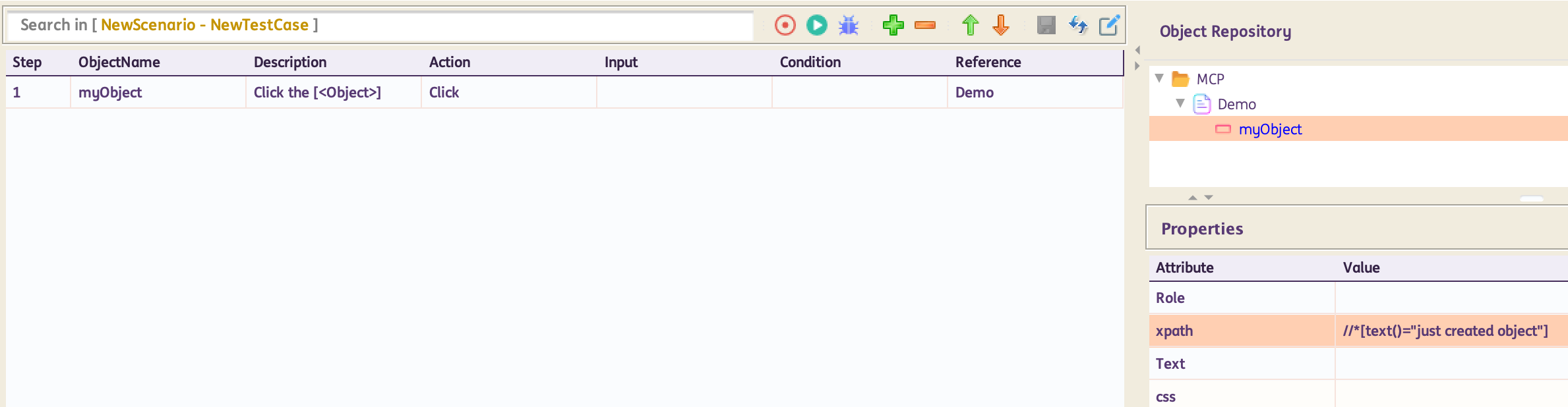
For standard usage:
For parameterized usage:
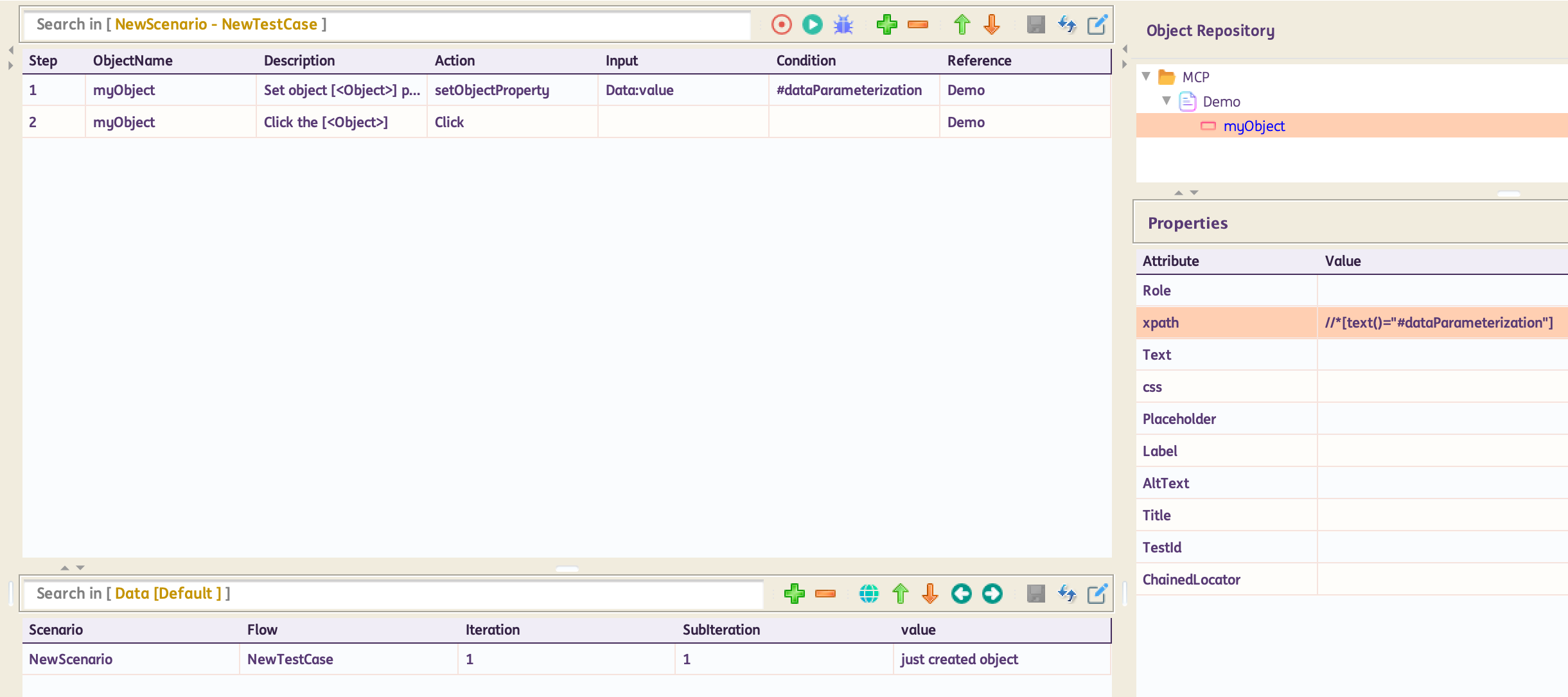
In the example above, part of the locator can be parameterized in the format #variableName. Note: This can also be done for all locators. In the test steps, use setObjectProperty. Input column will have the datasheet:column reference or variable reference from where to take the data. Condition column will have the parameterized part #variableName. Next test step would be a click or any other action on that object.
setglobalObjectProperty
Description: This function will set all objects property as data at runtime
Input Format : @Expected Text
| ObjectName | Action | Input | Condition | Reference | |
|---|---|---|---|---|---|
| Browser | setglobalObjectProperty |
@value | #var | PageName | Hardcoded Input |
| Browser | setglobalObjectProperty |
Sheet:Column | #var | PageName | Input from Datasheet |
| Browser | setglobalObjectProperty |
%dynamicVar% | #var | PageName | Input from variable |
Inputs in the Input column can be either hardcoded (in this case the data is preceded by a "@"), passed from the datasheet (datasheet name : column name) or passed from a variable value (%variable name%), as given in the above example.
@Action(object = ObjectType.BROWSER, desc = "Set  all objects property to [<Data>] at runtime.", input = InputType.YES, condition = InputType.YES)
    public void setglobalObjectProperty() {
        if (!Data.isEmpty()) {
            if (Condition.isEmpty()) {
                String[] groups = Data.split(",");
                for (String group : groups) {
                    String[] vals = group.split("=", 2);
                    AutomationObject.globalDynamicValue.put(vals[0], vals[1]);
                }
            } else {
                AutomationObject.globalDynamicValue.put(Condition, Data);
            }
            String text = String.format("Setting Global Object Property for %s with %s", Condition, Data);
            Report.updateTestLog(Action, text, Status.DONE);
        } else {
            Report.updateTestLog(Action, "Input should not be empty", Status.FAILNS);
        }
    }