String Operations
String Operations
Below are actions you may use to perform several string manipulations.
The result will be stored to dynamic variable %variableName% provided from the Condition column.
Different Input formats for String Operations
| Input Type | Format |
|---|---|
| Hardcoded String | "String value" |
| Input from Datasheet | {SheetName:ColumnName} |
| Input from Dynamic Variable | %DynamicVariableName% |
Concat
Description : This function appends the strings provided from the Input column.
Input Format : Comma separated strings, (i.e. "string_value 1","string_value 2","string_value 3","string_value 4","string_value 5")
Parameter :
string_value - set of strings to be concatenated to a new string, max number of string_value is 5
| ObjectName | Action | Input | Condition | Reference | |
|---|---|---|---|---|---|
| String Operations |  Concat |
"Hello,"," World","!","!","!" | %variableName% |  Hardcoded Input Hardcoded Input |
|
| String Operations | Concat |
{Sheet:Column}," World","!","!","!" | %variableName% | Input from Datasheet |
|
| String Operations | Concat |
%dynamicVar%," World","!","!","!" | %variableName% | Input from variable |
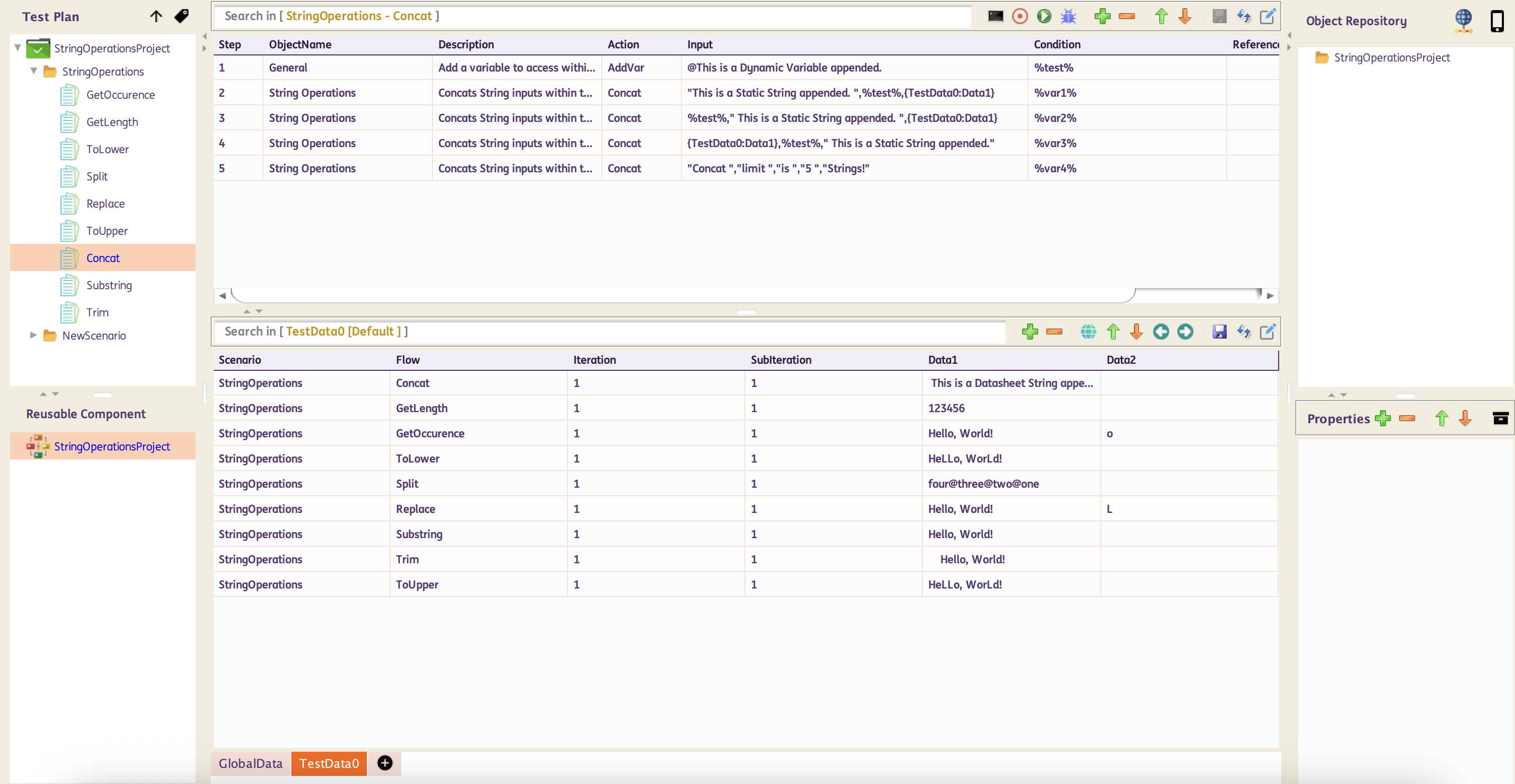
Below are sample Test Case and generated report on how to use String Operations Concat
Sample Test Case:
GetLength
Description : This function returns the length of the string.
Input Format : Single string value, (i.e. "string_value")
Parameter :
string_value - string value to get length
| ObjectName | Action | Input | Condition | Reference | |
|---|---|---|---|---|---|
| String Operations | GetLength |
"Hello, World!" | %variableName% | Hardcoded Input |
|
| String Operations | GetLength |
{Sheet:Column} | %variableName% | Input from Datasheet |
|
| String Operations | GetLength |
%dynamicVar% | %variableName% | Input from variable |
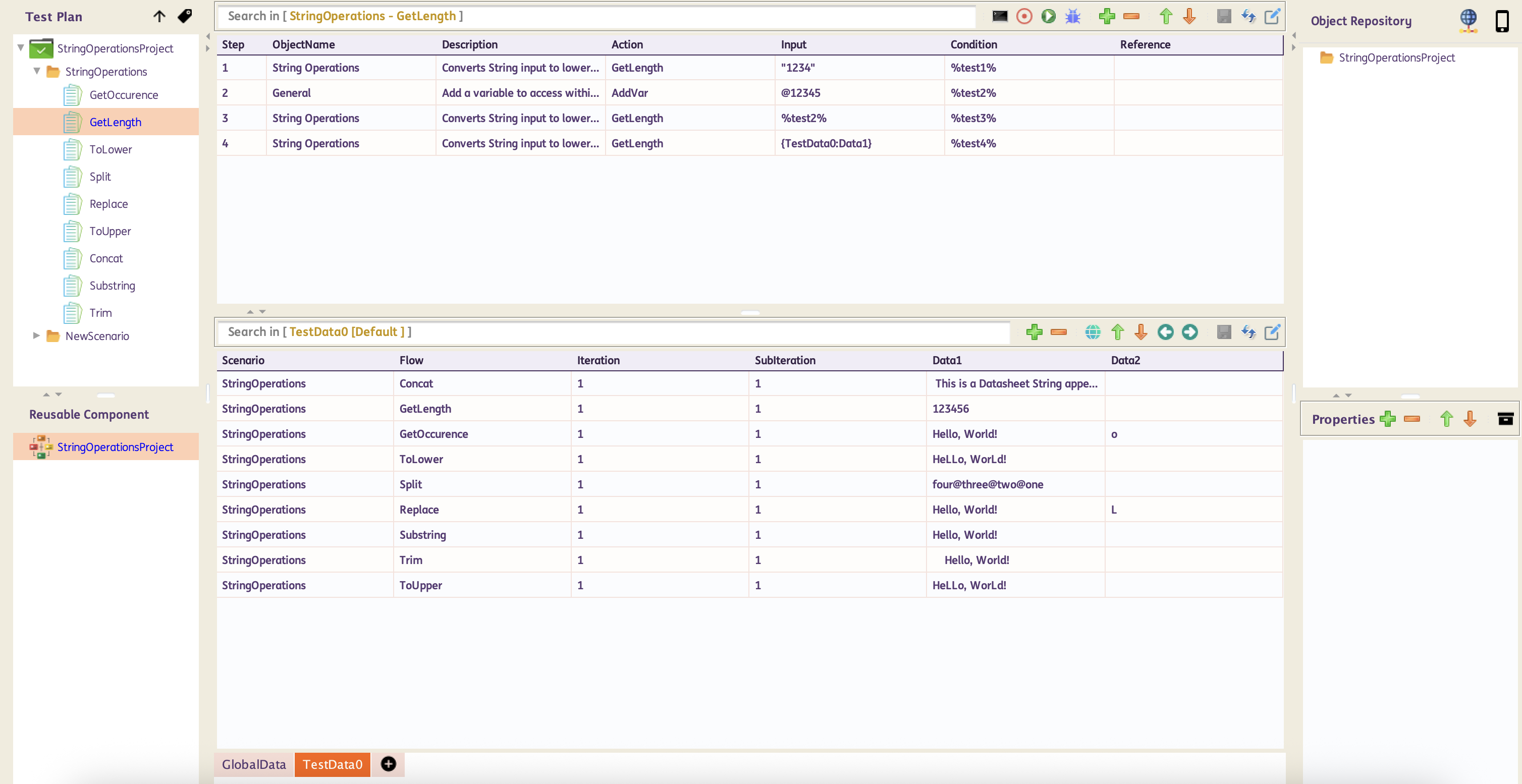
Below are sample Test Case and generated report on how to use String Operations GetLength
Sample Test Case:
GetOccurence
Description : This function returns the number of occurrences of the searched character.
Input Format : Comma separated string, (i.e. "target_string","search_character")
Parameter :
target_string - target string value to search
search_character - character value to search from the target string
| ObjectName | Action | Input | Condition | Reference | |
|---|---|---|---|---|---|
| String Operations | GetOccurence |
"Hello, World!","e" | %variableName% | Hardcoded Input |
|
| String Operations | GetOccurence |
{Sheet:Column},"e" | %variableName% | Input from Datasheet |
|
| String Operations | GetOccurence |
%dynamicVar%,"e" | %variableName% | Input from variable |
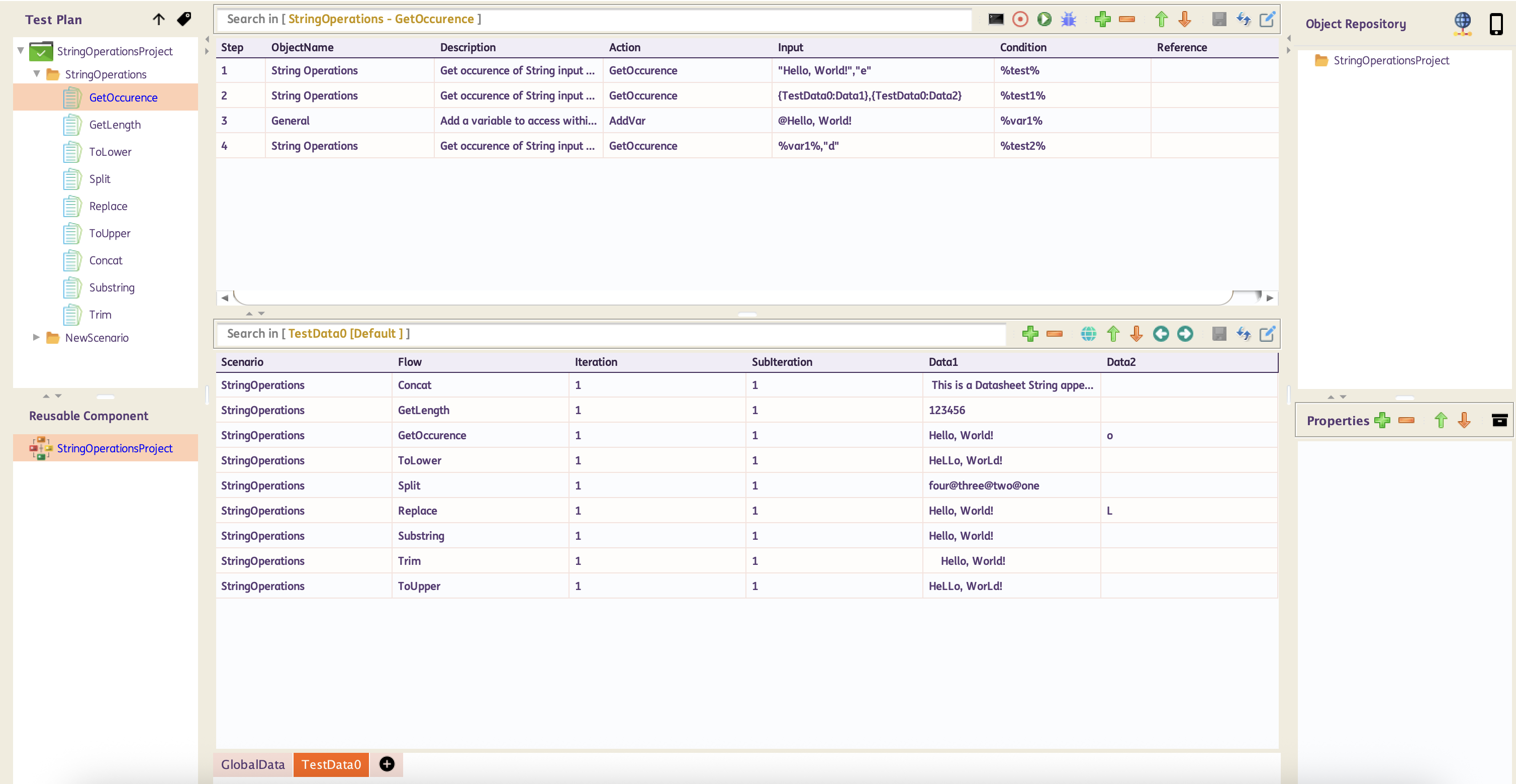
Below are sample Test Case and generated report on how to use String Operations GetOccurence
Sample Test Case:
Replace
Description : This function replaces the first or all occurrences of a character or substring within a string.
Input Format : Comma separated string, (i.e. "string_value","target_string","replacement_string","first/all")
Parameter :
string_value - original string value to replace
target_string - target string value or substring value to be replaced
replacement_string - string value or substring value to replace the target_string in the original string_value
first/all - type of string replacement if first instance only or all instance in the original string_value
| ObjectName | Action | Input | Condition | Reference | |
|---|---|---|---|---|---|
| String Operations | Replace |
"Hello, World!","o","a","first" | %variableName% | Hardcoded Input, Single character replace first instance only |
|
| String Operations | Replace |
{Sheet:Column},"o","a","first" | %variableName% | Input from Datasheet, Single character replace first instance only |
|
| String Operations | Replace |
%dynamicVar%,"o","a","first" | %variableName% | Input from variable, Single character replace first instance only |
|
| String Operations | Replace |
"Hello, World!","o","a","all" | %variableName% | Hardcoded Input, Single character replace all instance |
|
| String Operations | Replace |
{Sheet:Column},"o","a","all" | %variableName% | Input from Datasheet, Single character replace all instance |
|
| String Operations | Replace |
%dynamicVar%,"o","a","all" | %variableName% | Input from variable, Single character replace all instance |
|
| String Operations | Replace |
"apple pie pie","pie","cake","first" | %variableName% | Hardcoded Input, Multi-character replace first instance only |
|
| String Operations | Replace |
{Sheet:Column},"pie","cake","first" | %variableName% | Input from Datasheet, Multi-character replace first instance only |
|
| String Operations | Replace |
%dynamicVar%,"pie","cake","first" | %variableName% | Input from variable, Multi-character replace first instance only |
|
| String Operations | Replace |
"apple pie pie","pie","cake","all" | %variableName% | Hardcoded Input, Multi-character replace all instance |
|
| String Operations | Replace |
{Sheet:Column},"pie","cake","all" | %variableName% | Input from Datasheet, Multi-character replace all instance |
|
| String Operations | Replace |
%dynamicVar%,"pie","cake","all" | %variableName% | Input from variable, Multi-character replace all instance |
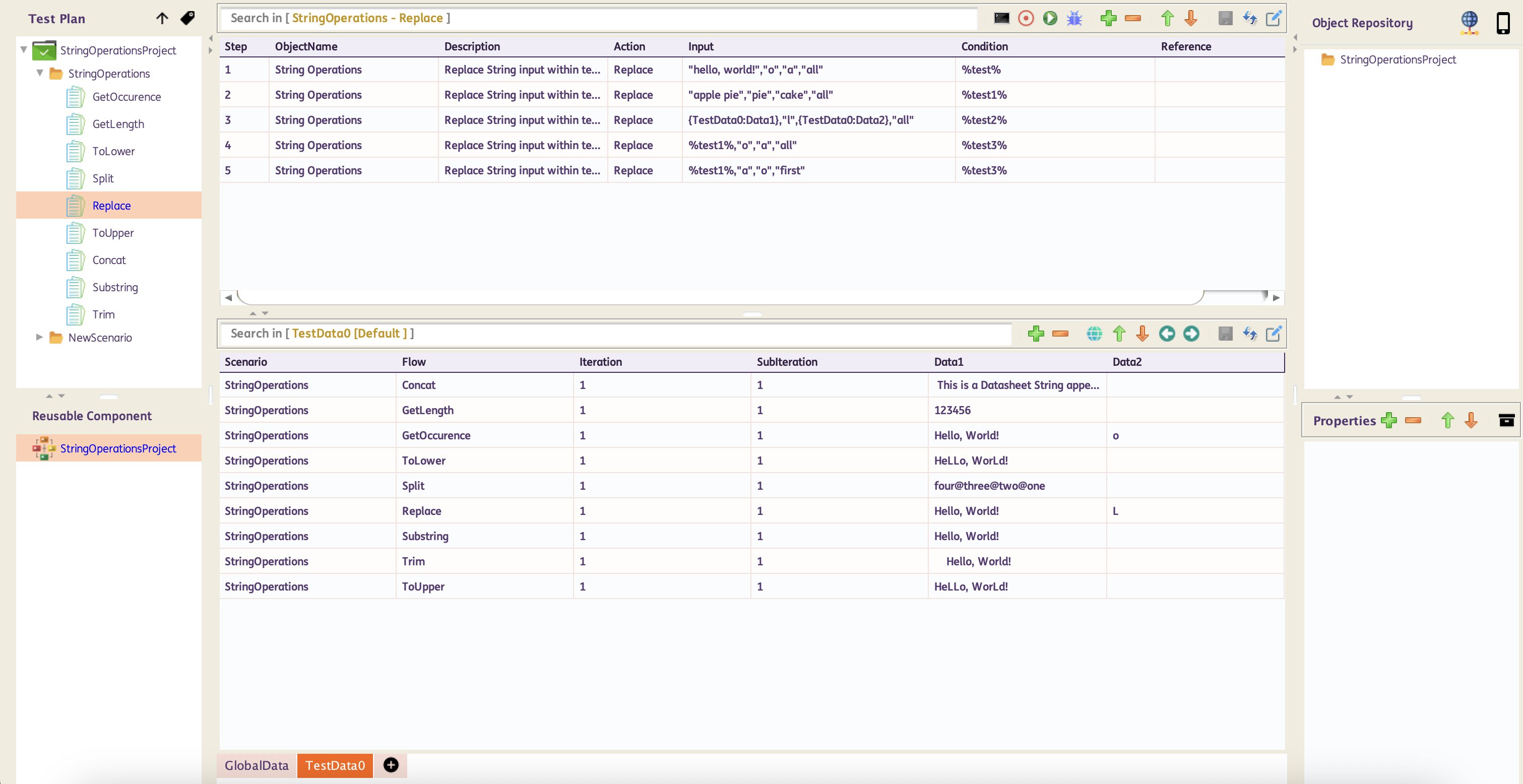
Below are sample Test Case and generated report on how to use String Operations Replace
Sample Test Case:
Split
Description : The function splits the string using the specified delimeter and returns a substring based on the provided index or number of limit the string will be splitted.
Input Format : Comma separated string, (i.e. "string_value","delimeter","index","limit")
Parameter :
string_value - string value to split
delimeter - separator to split the string
index - key index value to return in the action where base index is 0
limit - number of times the string will be splitted
| ObjectName | Action | Input | Condition | Reference | |
|---|---|---|---|---|---|
| String Operations | Split |
"one@two@three@four","@","1" | %variableName% | Hardcoded Input |
|
| String Operations | Split |
{Sheet:Column},"@","1" | %variableName% | Input from Datasheet |
|
| String Operations | Split |
%dynamicVar%,"@","1" | %variableName% | Input from variable |
|
| String Operations | Split |
"one@two@three@four","@","1","2" | %variableName% | Hardcoded Input, with limited no. of split |
|
| String Operations | Split |
{Sheet:Column},"@","1","2" | %variableName% | Input from Datasheet, with limited no. of split |
|
| String Operations | Split |
%dynamicVar%,"@","1","2" | %variableName% | Input from variable, with limited no. of split |
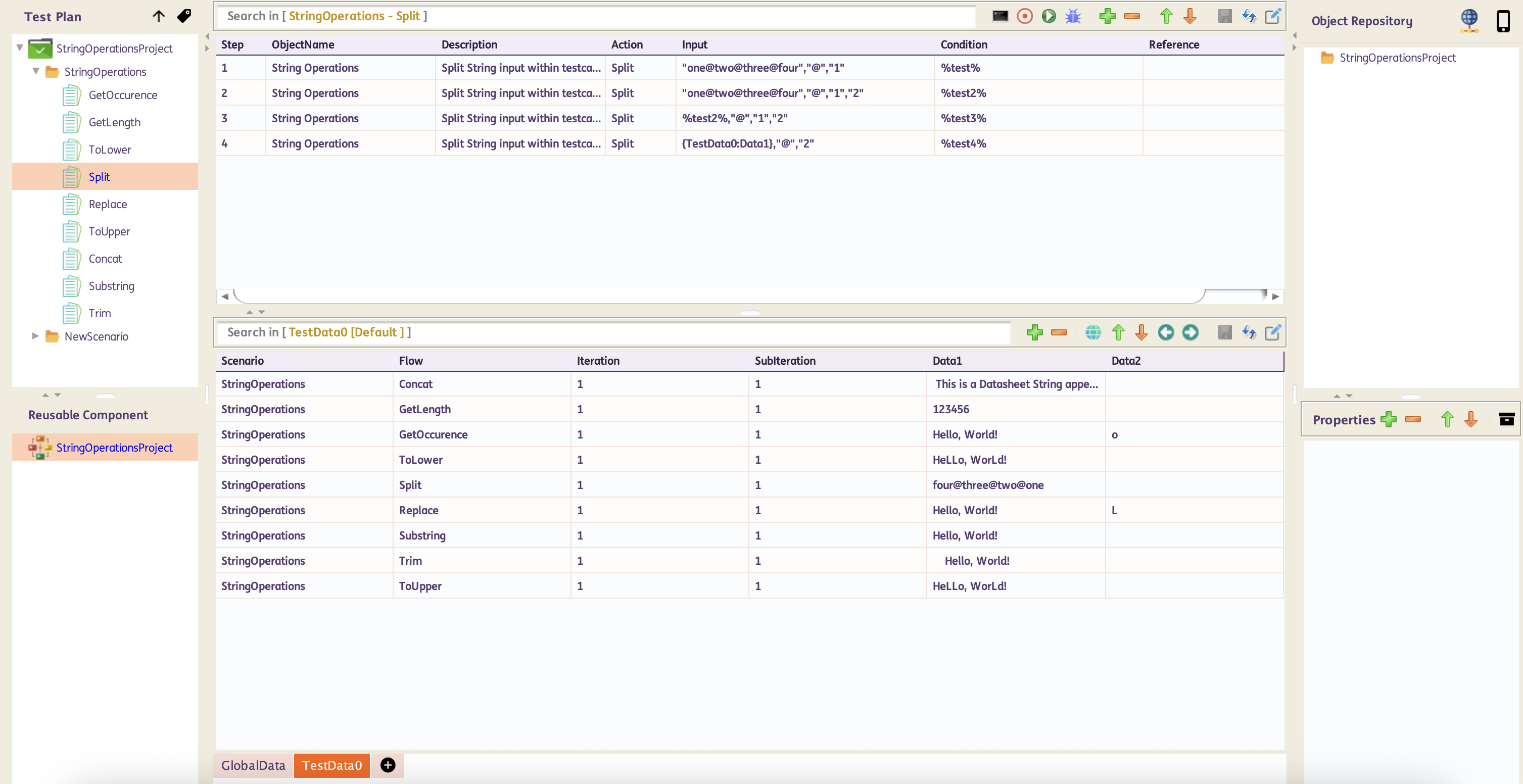
Below are sample Test Case and generated report on how to use String Operations Split
Sample Test Case:
Substring
Description : This function returns a new string that is a substring of the original string.
Input Format : Comma separated string, (i.e. "string_value","begin_index","end_index(optional)")
Parameter :
string_value - string value to get a substring value
begin_index - starting index of the substring
end_index(optional) - ending index of the substring
| ObjectName | Action | Input | Condition | Reference | |
|---|---|---|---|---|---|
| String Operations | Substring |
"Hello, World!","7" | %variableName% | Hardcoded Input |
|
| String Operations | Substring |
{Sheet:Column},"7" | %variableName% | Input from Datasheet |
|
| String Operations | Substring |
%dynamicVar%,"7" | %variableName% | Input from variable |
|
| String Operations | Substring |
"Hello, World!","1","7" | %variableName% | Hardcoded Input, with end index |
|
| String Operations | Substring |
{Sheet:Column},"1","7" | %variableName% | Input from Datasheet, with end index |
|
| String Operations | Substring |
%dynamicVar%,"1","7" | %variableName% | Input from variable, with end index |
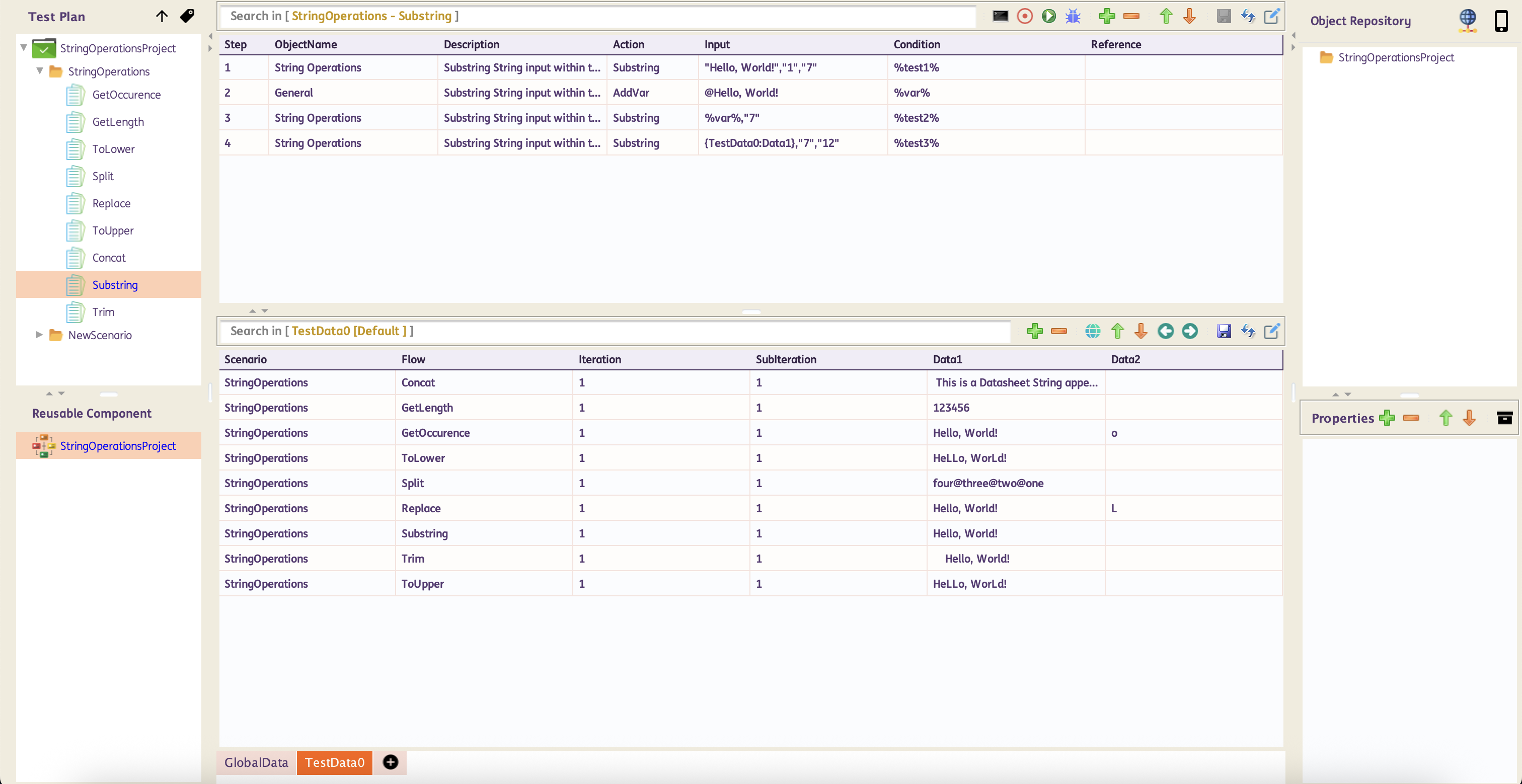
Below are sample Test Case and generated report on how to use String Operations Substring
Sample Test Case:
ToLower
Description : This function converts a String to lowercase.
Input Format : Single string value, (i.e. "string_value 1")
Parameter :
string_value - string value to be converted to lowercase
| ObjectName | Action | Input | Condition | Reference | |
|---|---|---|---|---|---|
| String Operations | ToLower |
"Hello, World!" | %variableName% | Hardcoded Input |
|
| String Operations | ToLower |
{Sheet:Column} | %variableName% | Input from Datasheet |
|
| String Operations | ToLower |
%dynamicVar% | %variableName% | Input from variable |
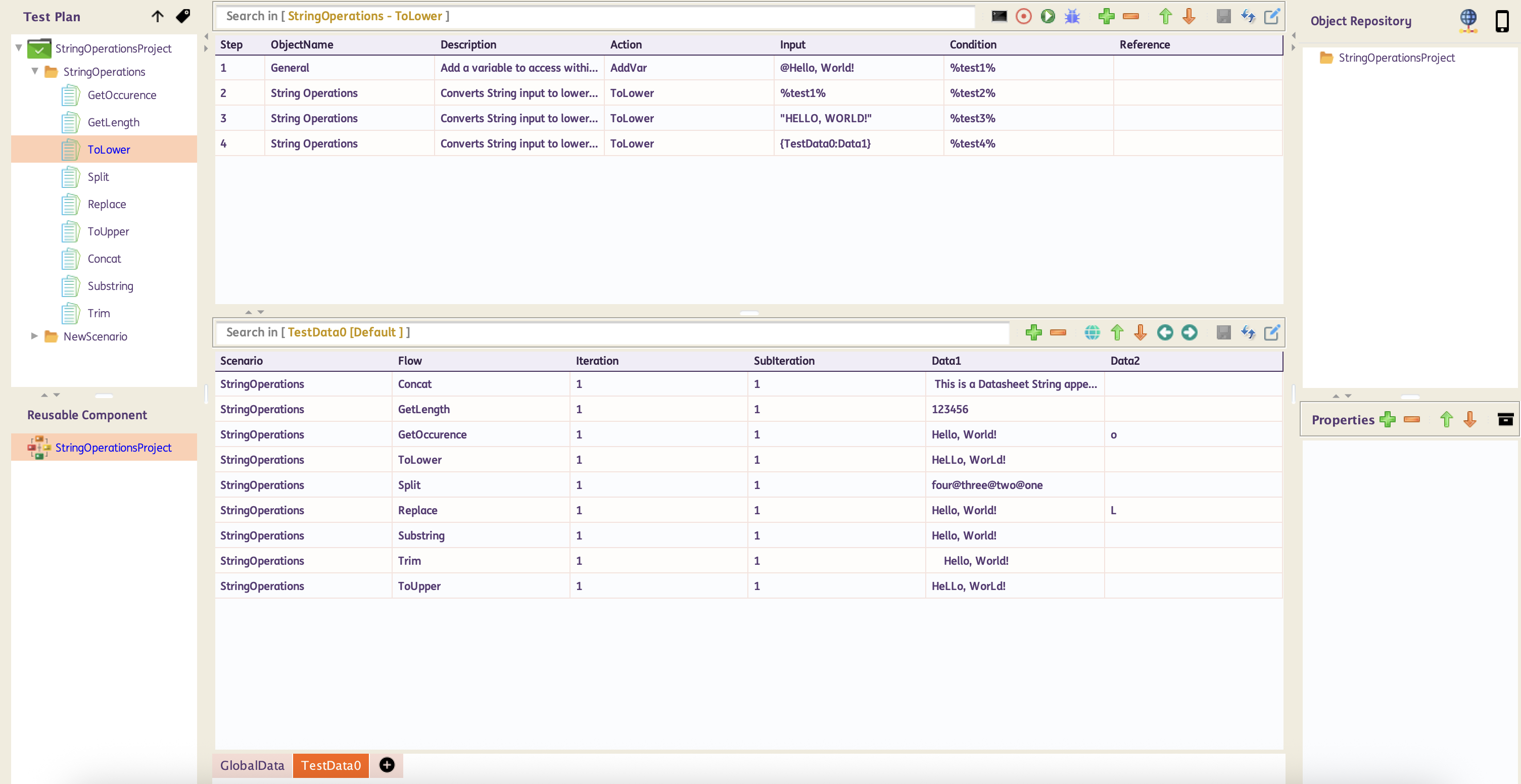
Below are sample Test Case and generated report on how to use String Operations ToLower
Sample Test Case:
ToUpper
Description : This function converts a String to uppercase.
Input Format : Single string value, (i.e. "string_value 1")
Parameter :
string_value - string value to be converted to uppercase
| ObjectName | Action | Input | Condition | Reference | |
|---|---|---|---|---|---|
| String Operations | ToUpper |
"Hello, World!" | %variableName% | Hardcoded Input |
|
| String Operations | ToUpper |
{Sheet:Column} | %variableName% | Input from Datasheet |
|
| String Operations | ToUpper |
%dynamicVar% | %variableName% | Input from variable |
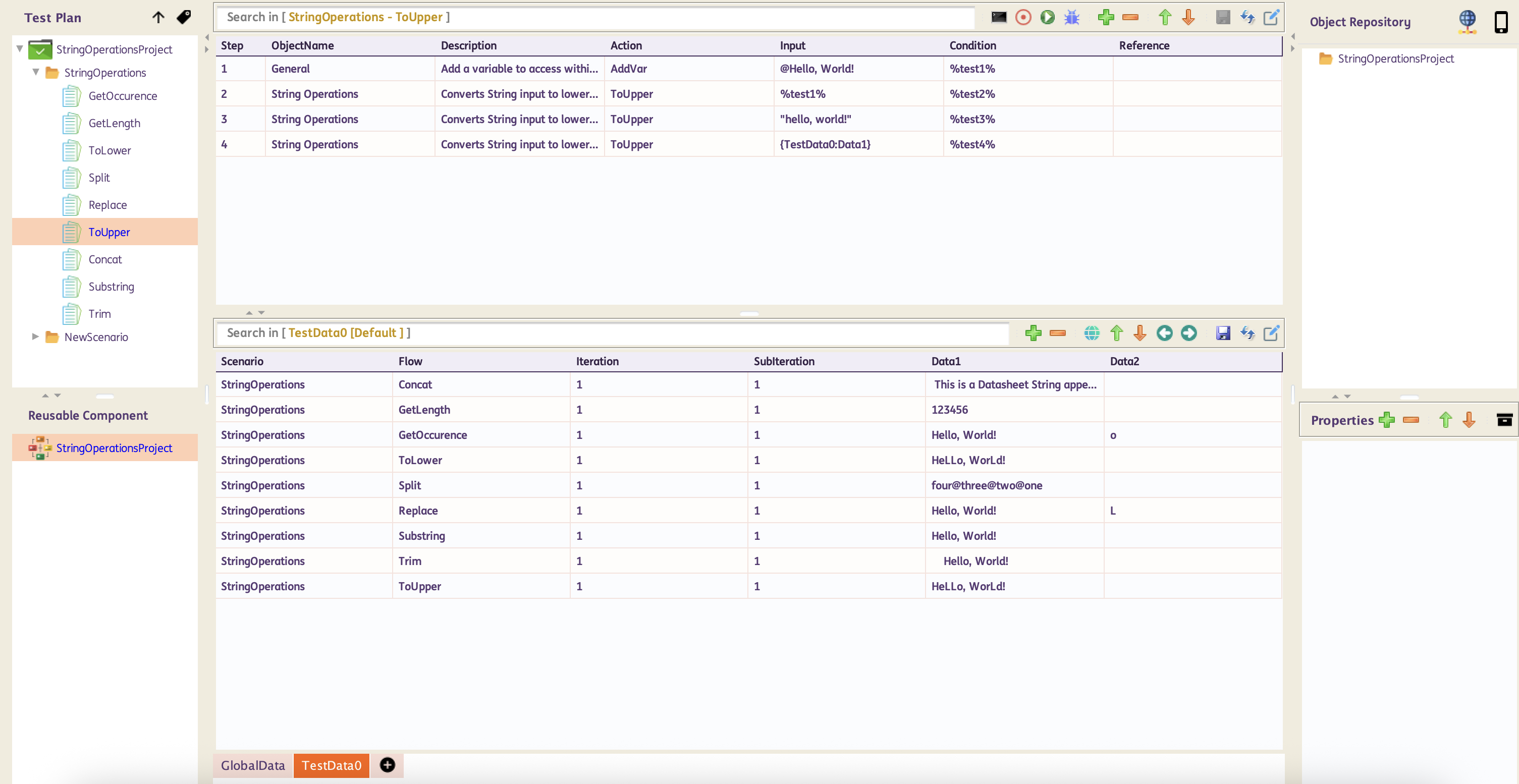
Below are sample Test Case and generated report on how to use String Operations ToUpper
Sample Test Case:
Trim
Description : This function removes any leading or trailing whitespace characters (including spaces, tabs and newline characters).
Input Format : Single string value, (i.e. "string_value 1")
Parameter :
string_value - string value to be trimmed
| ObjectName | Action | Input | Condition | Reference | |
|---|---|---|---|---|---|
| String Operations | Trim |
" Hello, World! " | %variableName% | Hardcoded Input |
|
| String Operations | Trim |
{Sheet:Column} | %variableName% | Input from Datasheet |
|
| String Operations | Trim |
%dynamicVar% | %variableName% | Input from variable |
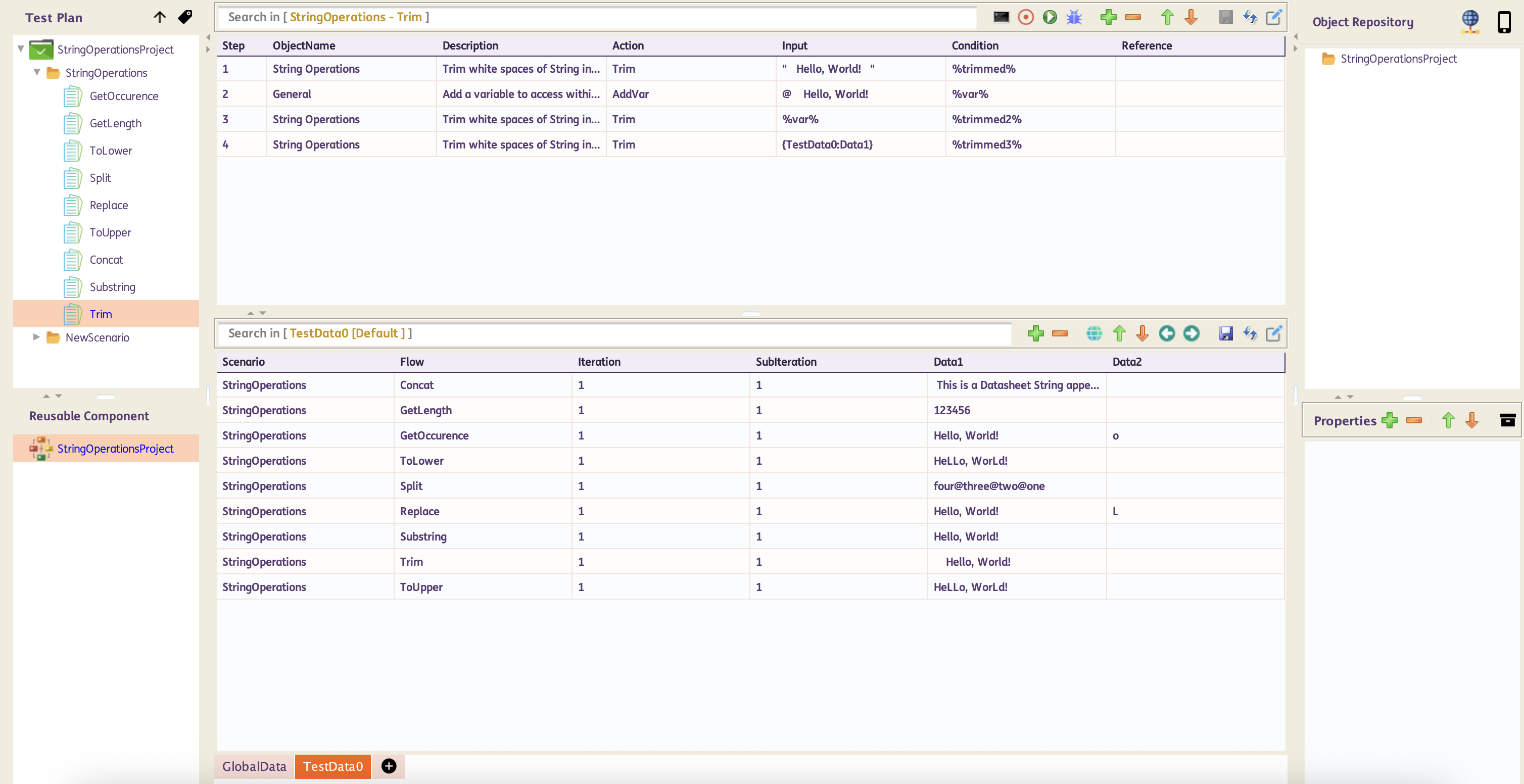
Below are sample Test Case and generated report on how to use String Operations Trim
Sample Test Case: