Dynamic Object
setFilterHasText
Description: Sets a filter for the locator to match elements containing the specified text.
Input Format: @Expected Text
| ObjectName | Action | Input | Condition | Reference | |
|---|---|---|---|---|---|
| Object |  setFilterHasText |
@value | PageName |  Hardcoded Input |
|
| Object | setFilterHasText |
Sheet:Column | PageName | Input from Datasheet |
|
| Object | setFilterHasText |
%dynamicVar% | PageName | Input from variable |
@Action(object = ObjectType.PLAYWRIGHT, desc = "Set filter `Has Text` for the locator", input = InputType.YES, condition = InputType.NO)
public void setFilterHasText() {
    if (!Data.isEmpty()) {
        AutomationObject.locatorFiltersMap.computeIfAbsent(Reference+ObjectName, k -> new ArrayList<>()).add("setHasText: "+ Data);
        String text = String.format("Setting Filter 'Has Text' with '%s' for Object [%s - %s]",
                Data, Reference, ObjectName);
        Report.updateTestLog(Action, text, Status.DONE);
    } else {
        Report.updateTestLog(Action, "Input should not be empty", Status.FAILNS);
    }
}
setFilterHasNotText
Description: Sets a filter for the locator to exclude elements containing the specified text.
Input Format: @Expected Text
| ObjectName | Action | Input | Condition | Reference | |
|---|---|---|---|---|---|
| Object | setFilterHasNotText |
@value | PageName | Hardcoded Input |
|
| Object | setFilterHasNotText |
Sheet:Column | PageName | Input from Datasheet |
|
| Object | setFilterHasNotText |
%dynamicVar% | PageName | Input from variable |
@Action(object = ObjectType.PLAYWRIGHT, desc = "Set filter `Has Not Text` for the locator", input = InputType.YES, condition = InputType.NO)
public void setFilterHasNotText() {
    if (!Data.isEmpty()) {
        AutomationObject.locatorFiltersMap.computeIfAbsent(Reference+ObjectName, k -> new ArrayList<>()).add("setHasNotText: "+ Data);
        String text = String.format("Setting Filter 'Has Not Text' with '%s' for Object [%s - %s]",
                Data, Reference, ObjectName);
        Report.updateTestLog(Action, text, Status.DONE);
    } else {
        Report.updateTestLog(Action, "Input should not be empty", Status.FAILNS);
    }
}
setFilterIsVisible
Description: Sets a filter for the locator to match elements based on their visibility.
Input Format: @Expected Text (e.g., true/false)
| ObjectName | Action | Input | Condition | Reference | |
|---|---|---|---|---|---|
| Object | setFilterIsVisible |
@value | PageName | Hardcoded Input |
|
| Object | setFilterIsVisible |
Sheet:Column | PageName | Input from Datasheet |
|
| Object | setFilterIsVisible |
%dynamicVar% | PageName | Input from variable |
@Action(object = ObjectType.PLAYWRIGHT, desc = "Set filter `Visible` for the locator", input = InputType.YES, condition = InputType.NO)
public void setFilterIsVisible() {
    if (!Data.isEmpty()) {
        AutomationObject.locatorFiltersMap.computeIfAbsent(Reference+ObjectName, k -> new ArrayList<>()).add("setVisible: "+ Data);
        String text = String.format("Setting Filter 'Visible' with '%s' for Object [%s - %s]",
                Data, Reference, ObjectName);
        Report.updateTestLog(Action, text, Status.DONE);
    } else {
        Report.updateTestLog(Action, "Input should not be empty", Status.FAILNS);
    }
}
setFilterIndex
Description: Sets a filter for the locator to match elements at a specific index.
Input Format: @Expected Index (integer)
| ObjectName | Action | Input | Condition | Reference | |
|---|---|---|---|---|---|
| Object | setFilterIndex |
@value | PageName | Hardcoded Input |
|
| Object | setFilterIndex |
Sheet:Column | PageName | Input from Datasheet |
|
| Object | setFilterIndex |
%dynamicVar% | PageName | Input from variable |
@Action(object = ObjectType.PLAYWRIGHT, desc = "Set filter `Index` for the locator", input = InputType.YES, condition = InputType.NO)
public void setFilterIndex() {
    if (!Data.isEmpty()) {
        AutomationObject.locatorFiltersMap.computeIfAbsent(Reference+ObjectName, k -> new ArrayList<>()).add("setIndex: "+ Data);
        String text = String.format("Setting Filter 'Index' with '%s' for Object [%s - %s]",
                Data, Reference, ObjectName);
        Report.updateTestLog(Action, text, Status.DONE);
    } else {
        Report.updateTestLog(Action, "Input should not be empty", Status.FAILNS);
    }
}
setObjectProperty
Description: This function will set object property as data at runtime
Input Format : @Expected Text
| ObjectName | Action | Input | Condition | Reference | |
|---|---|---|---|---|---|
| Object | setObjectProperty |
@value | #var | PageName | Hardcoded Input |
| Object | setObjectProperty |
Sheet:Column | #var | PageName | Input from Datasheet |
| Object | setObjectProperty |
%dynamicVar% | #var | PageName | Input from variable |
Inputs in the Input column can be either hardcoded (in this case the data is preceded by a "@"), passed from the datasheet (datasheet name : column name) or passed from a variable value (%variable name%), as given in the above example.
Inline Object Property Override
Instead of adding a separate setObjectProperty step, the override can be supplied inline in the Condition column of the locator-based step itself (Click, Fill, selectSingleByVisibleText, an assertion, etc.). The engine resolves and applies the override just before the element is located, so the placeholders in the locator are substituted for that step only.
Syntax
| Marker | Scope |
|---|---|
setProp: |
Object-scoped — applies only to the element used in that step. Requires an Object Repository element (ObjectName + Reference). |
setGlobalProp: |
Global — applies the token to every object that uses it, like setglobalObjectProperty. |
Rules
- Tokens are the
#variableNameplaceholders defined in the object's locator. - Multiple pairs are separated by
;. - Each pair splits on the first
=only, so the value itself may contain=(for example a URL query string). - Values accept the same formats as the Input column: a hardcoded literal,
Sheet:Column,%runtimeVar%or#globalDataId. They are resolved through the normal data pipeline. - An optional
|subiter=Nsuffix on a value picks a specific datasheet sub-iteration for that token, overriding the step's own sub-iteration. - Markers are case-insensitive (
setProp:,SETPROP:,setprop:all work). - Malformed pairs are ignored; if no valid pair remains the override is skipped and logged as
DEBUG.
Usage
| ObjectName | Action | Input | Condition | Reference | |
|---|---|---|---|---|---|
| Object | Click |
setProp: #id=@submitBtn |
PageName | Hardcoded value |
|
| Object | Click |
setProp: #id=Products:SKU |
PageName | Value from Datasheet |
|
| Object | Click |
setProp: #id=%dynamicVar% |
PageName | Value from variable |
|
| Object | Fill |
Sheet:Column | setProp: #row=%currentRow%; #status=Data:State |
PageName | Multiple tokens |
| Object | Click |
setProp: #id=Products:SKU\|subiter=3 |
PageName | Specific sub-iteration |
|
| Object | Click |
setGlobalProp: #env=Prod |
PageName | Global scope |
Building the expression in the IDE
While editing the Condition cell of an eligible step, type * to open the inline-property builder instead of typing the expression by hand. In the dialog you pick the scope (Object (this element) or Global (all elements)), choose a token from the dropdown (populated from the selected object's locator attributes in the Object Repository), supply the value (with suggestions for Sheet:Column references and %variables%), and optionally set the sub-iteration. An existing expression is loaded back into the dialog for editing.
A step is eligible when it references an Object Repository element (both ObjectName and Reference are filled) and its action does not already use the Condition column for its own semantics.
Note
The applied override is reported as a separate setObjectProperty (or setGlobalObjectProperty) log entry so the report does not repeat the real action name for the property-setting sub-step.
@Action(object = ObjectType.PLAYWRIGHT, desc = "Set object [<Object>] property  as [<Data>] at runtime", input = InputType.YES, condition = InputType.YES)
    public void setObjectProperty() {
        if (!Data.isEmpty()) {
            if (Condition.isEmpty()) {
                String[] groups = Data.split(",");
                for (String group : groups) {
                    String[] vals = group.split("=", 2);
                    setProperty(vals[0], vals[1]);
                }
            } else {
                setProperty(Condition, Data);
            }
            String text = String.format("Setting Object Property for %s with %s for Object [%s - %s]",
                    Condition, Data, Reference, ObjectName);
            Report.updateTestLog(Action, text, Status.DONE);
        } else {
            Report.updateTestLog(Action, "Input should not be empty", Status.FAILNS);
        }
    }
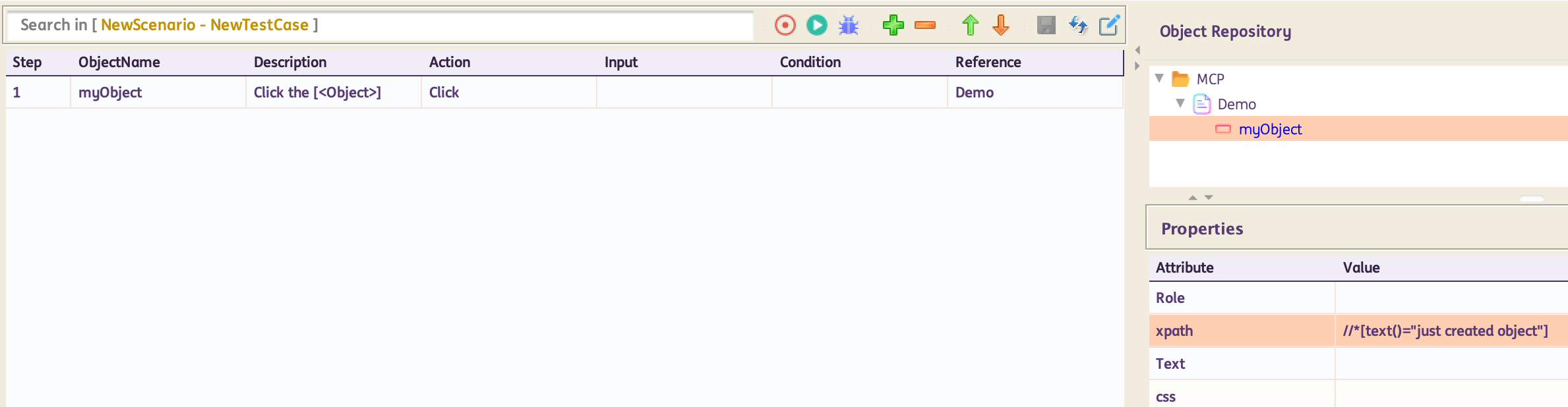
For standard usage:
For parameterized usage:
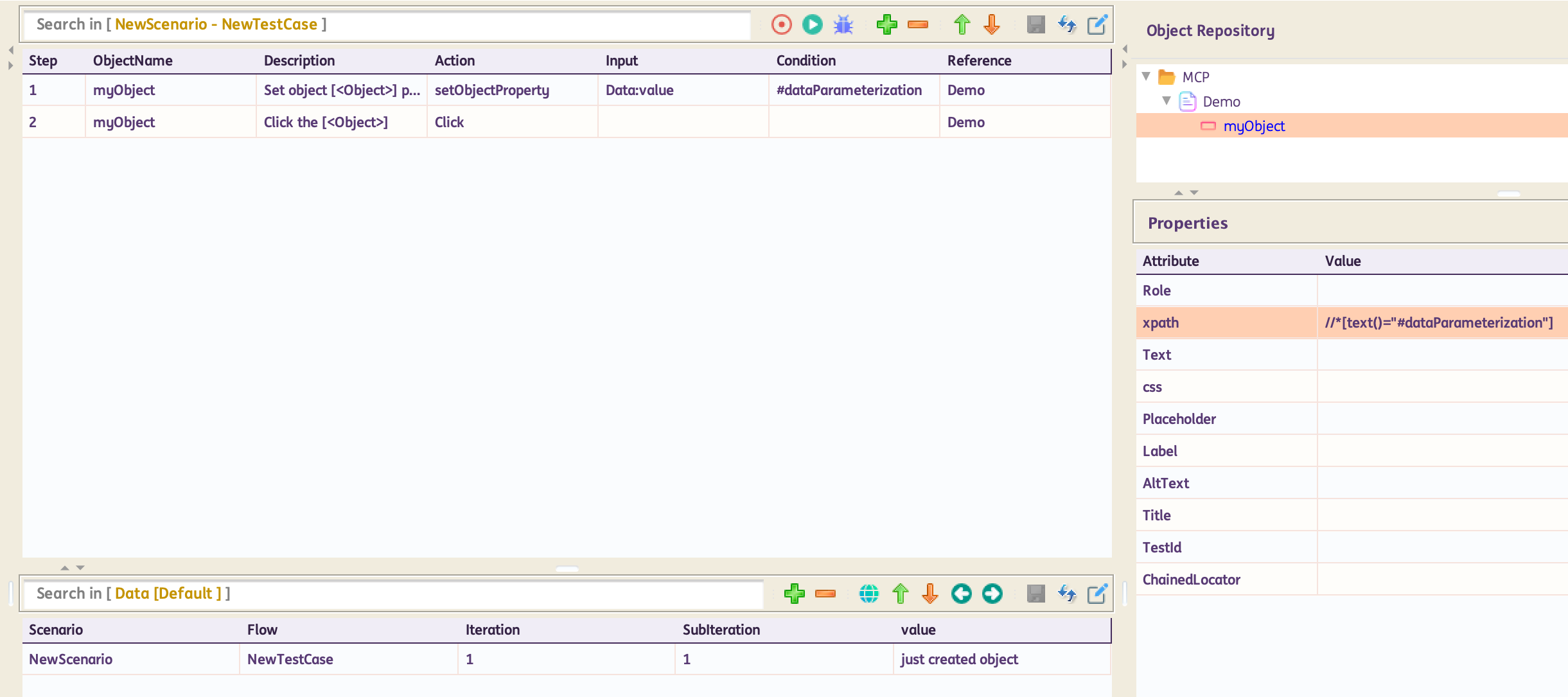
In the example above, part of the locator can be parameterized in the format #variableName. Note: This can also be done for all locators. In the test steps, use setObjectProperty. Input column will have the datasheet:column reference or variable reference from where to take the data. Condition column will have the parameterized part #variableName. Next test step would be a click or any other action on that object.
setglobalObjectProperty
Description: This function will set all objects property as data at runtime
Input Format : @Expected Text
| ObjectName | Action | Input | Condition | Reference | |
|---|---|---|---|---|---|
| Browser | setglobalObjectProperty |
@value | #var | PageName | Hardcoded Input |
| Browser | setglobalObjectProperty |
Sheet:Column | #var | PageName | Input from Datasheet |
| Browser | setglobalObjectProperty |
%dynamicVar% | #var | PageName | Input from variable |
Inputs in the Input column can be either hardcoded (in this case the data is preceded by a "@"), passed from the datasheet (datasheet name : column name) or passed from a variable value (%variable name%), as given in the above example.
@Action(object = ObjectType.BROWSER, desc = "Set  all objects property to [<Data>] at runtime.", input = InputType.YES, condition = InputType.YES)
    public void setglobalObjectProperty() {
        if (!Data.isEmpty()) {
            if (Condition.isEmpty()) {
                String[] groups = Data.split(",");
                for (String group : groups) {
                    String[] vals = group.split("=", 2);
                    AutomationObject.globalDynamicValue.put(vals[0], vals[1]);
                }
            } else {
                AutomationObject.globalDynamicValue.put(Condition, Data);
            }
            String text = String.format("Setting Global Object Property for %s with %s", Condition, Data);
            Report.updateTestLog(Action, text, Status.DONE);
        } else {
            Report.updateTestLog(Action, "Input should not be empty", Status.FAILNS);
        }
    }