User Intent
Note
User Intent is the current name for what was previously called a Reusable Component (you may still see "Reusable"/"Reusable Component" used interchangeably in older material, menus, and file/folder names).
What is a User Intent?
A User Intent is a self-contained, named group of test steps that represents a single discrete action a user performs in the application under test, such as Login, Add to Cart, or Submit Form. Instead of duplicating the same steps in every test case that needs them, you build the action once as a User Intent and Execute it from any number of other test cases. It's also the label used for the panel in the Test Design pane where these are created and organized — see Know the Framework for where this fits among the other Test Design panels.
Key Benefits:
- Eliminate duplication – Author a user intent once and call it from as many test cases as needed.
- Centralized maintenance – Update the User Intent once and every test case that executes it picks up the change automatically.
- Faster authoring – Compose new test cases largely out of existing User Intents instead of raw steps.
- Cross-project reuse – Promote a User Intent to Shared so it can be executed from any project opened in the same INGenious installation.
User Intent Scenarios and Test Cases follow the same structure as the Test Plan:
- Every User Intent Scenario is a
Directoryon disk and typically groups a related set of intents (for example, aCommonscenario forLogin/Logout, or aPurchasescenario forAdd to Cart/Checkout). - Every User Intent Test Case inside that scenario is a
.csvfile, and represents one User Intent.
You'll also see the "User Intent" terminology surface outside of Test Design, in places where a set of steps can be generated automatically and you get to choose the kind of artifact to create:
- API Workbench / Convert to Test Case – when converting an API request, you can choose to generate a Test Case or a User Intent.
- Import Postman/Bruno Collections – when importing a collection, each request can be converted into a Test Case or a User Intent.
Choosing the User Intent option in either flow creates the result directly as a User Intent Test Case, ready to be executed from other test cases, instead of a standalone Test Plan test case.
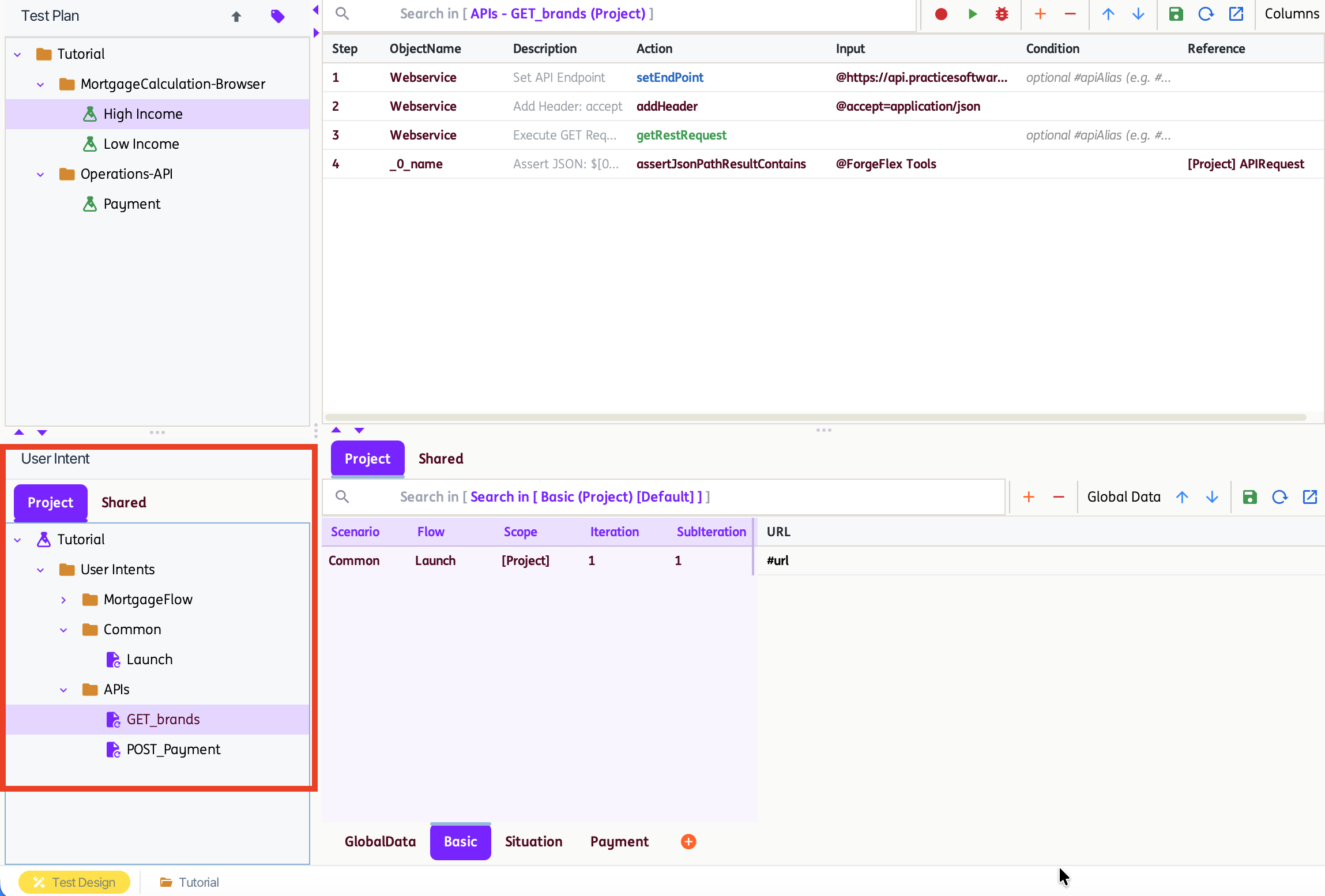
Project and Shared User Intent
There are two scopes of User Intent:
-
Project User Intent
Contains User Intents that can be used within the project and are managed from the
Projecttab under theUser Intentpanel in the Test Design pane.They live under
<ProjectName>\ReusableComponents\in the project directory (the on-disk folder name still reflects the older "Reusable Components" name).For projects created before version 3.0, the tool uses a
ReusableComponent.xmlfile located at the project root to organize User Intent Scenarios and Test Cases:<Root ref="Example" type="RC"> <Folder ref="UI"> <Scenario ref="Common"> <TestCase exeType="Executable" ref="Login"/> </Scenario> <Scenario ref="Purchase"> <TestCase exeType="Executable" ref="Add to Cart"/> <TestCase exeType="Executable" ref="Checkout"/> <TestCase exeType="Executable" ref="Logout"/> </Scenario> </Folder> </Root>For projects loaded in version 3.0, the legacy
ReusableComponent.xmlis automatically migrated and reorganized into theReusableComponentsfolder structure. The original file is preserved as a.bakfile under<ProjectName>.When a Project User Intent is used in a test step, the Action is
Scenario:TestCaseand the Reference is[Project]. -
Shared User Intent
Contains User Intents that can be used across different projects opened in the same INGenious installation, and are managed from the
Sharedtab under theUser Intentpanel in the Test Design pane.They live outside any single project, under
Shared\SharedReusableComponents\at the application level — so any project can reference the same Shared User Intent without copying it.A manifest file tracks which projects currently reference each Shared User Intent. INGenious uses this list to warn you before a rename or delete affects other projects (see Renaming and Deleting Shared User Intent).
When a Shared User Intent is used in a test step, the Action is
Scenario:TestCaseand the Reference is[Shared]. -
User Intent Scenarios and Test Cases may share the same names across the Project and Shared scopes. However, names must remain unique within each individual scope.
Creating a User Intent
There are a few ways to create a User Intent:
- Create User Intent – Right-click a Test Case (or selection of steps) in the Test Plan and choose Create User Intent. In the dialog, choose the target scope (Project or Shared), pick or create the target Scenario Name, and give it a Test Case Name.
- Make As Project User Intent / Make As Shared User Intent – Right-click an existing Test Plan test case and promote it directly into either scope.
- Convert to Automation (API Workbench) – When converting an API request into an automated artifact, choose User Intent instead of Test Case as the target type.
- Import Collections – When importing a Postman or Bruno collection, choose User Intent instead of Test Case as the target type for the imported requests. See Import Postman and Bruno Collections.
Using (Executing) a User Intent
A User Intent is invoked from any other test case using the Execute action:
| Field | Value |
|---|---|
| ObjectName | Execute |
| Action | <Scenario>:<TestCase> |
| Reference | [Project] for a Project User Intent, [Shared] for a Shared User Intent |
As a best practice, compose your test cases only from User Intents rather than mixing in loose, one-off steps — this keeps maintenance centralized and makes larger flows easier to read.
To jump to the definition of a User Intent that's called from a test step, right-click the step and choose Go To User Intent.
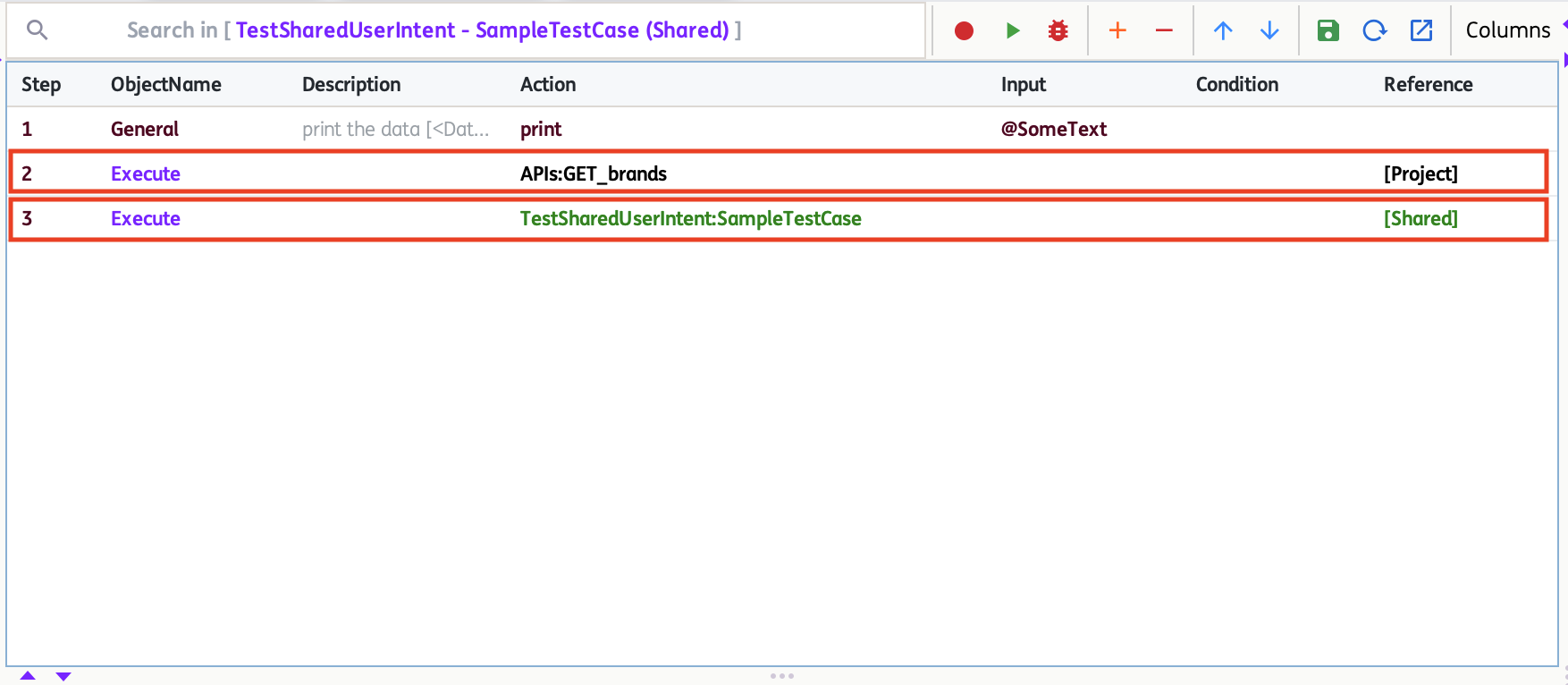
Moving and Promoting User Intent
A User Intent is not locked to the scope it was created in. Right-click a User Intent (or a Shared User Intent) to move it between scopes:
- Make As Shared User Intent – Promotes a Project User Intent to Shared, making it available to other projects.
- Move to Project User Intent – Demotes a Shared User Intent back to a single project's scope.
- Copy variants of both operations are also available when you want to keep the original in place.
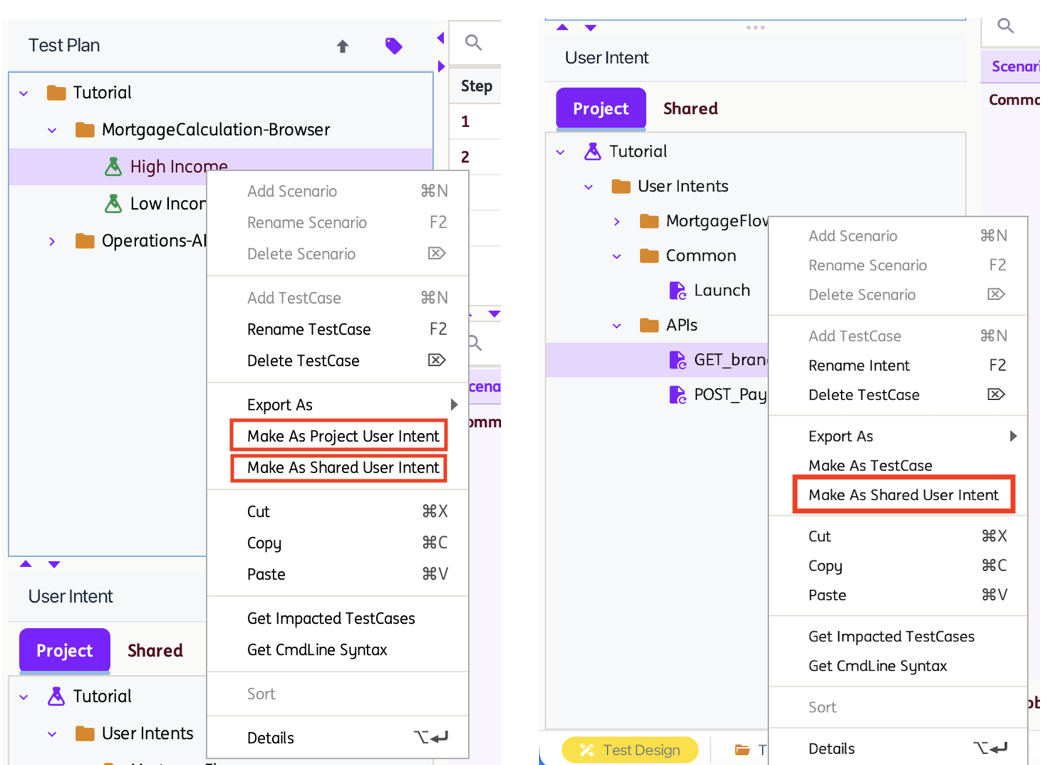
Whenever a User Intent is moved or renamed, INGenious automatically rewrites every Execute reference to it elsewhere in the project, and confirms with a message such as:
"Moved to Shared User Intent completed. All impacted test cases have been updated (N)."
Renaming and Deleting Shared User Intent
Because a Shared User Intent may be referenced by test cases in several different projects, INGenious checks the shared manifest before a destructive change and warns you if other projects depend on it, for example:
- Delete Shared User Intents – lists every project on disk that currently references the Shared User Intent before you confirm the deletion.
- Rename Shared User Intent - References Found – lists every project on disk that would be affected by the rename.
Review the listed projects before proceeding — test cases in other projects that reference the Shared User Intent by its old name will not resolve until they are updated.
User Intent in Loops and With Specific Data
User Intents can also be executed repeatedly or against a specific row of data using loop and parameter blocks. See the following sections in Additional Features: