Project Health
Overview
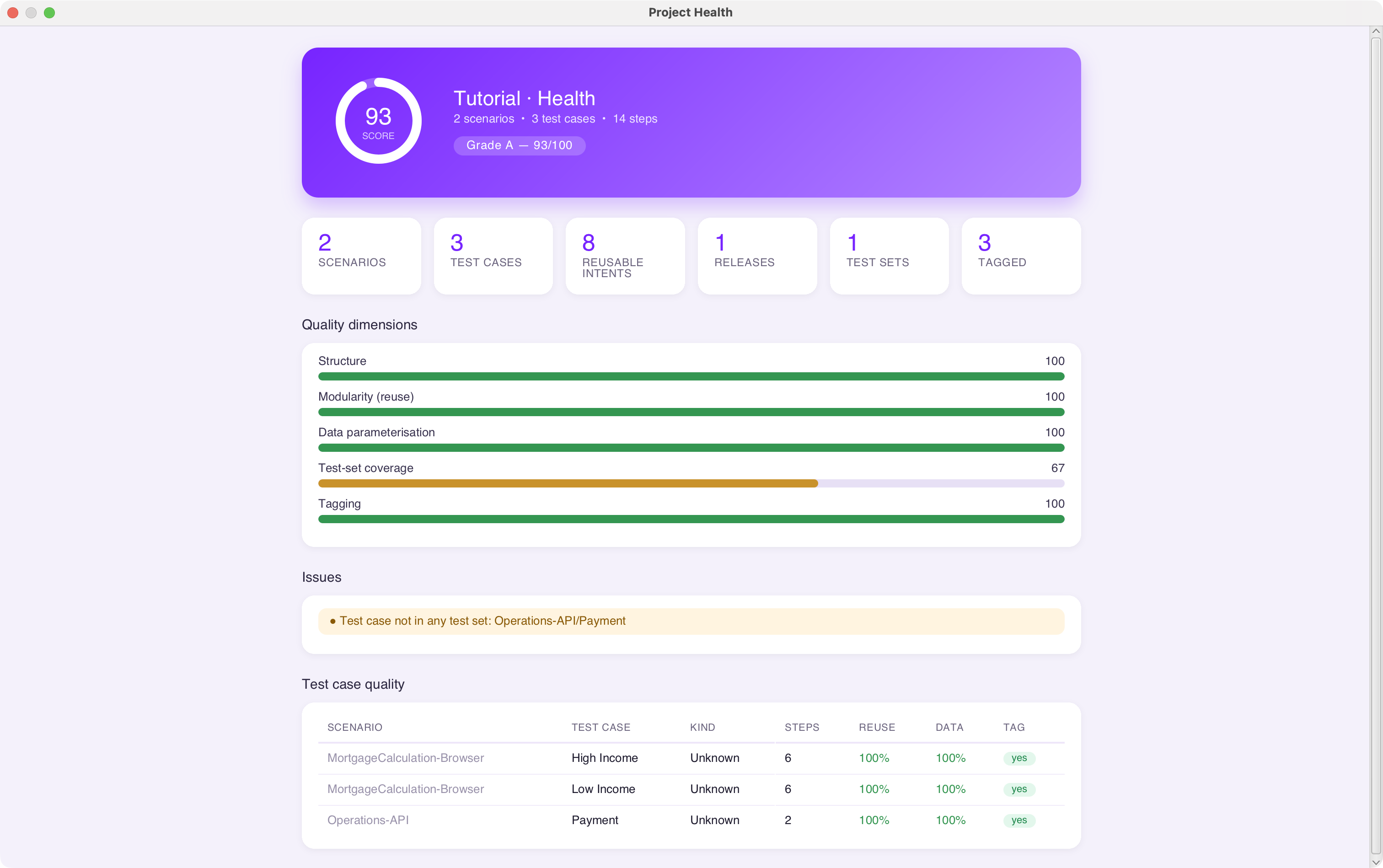
Project Health is a built-in, read-only audit of the project that is currently open in the IDE. It inspects every scenario, test case and test step, scores the project across five quality dimensions, assigns an overall grade from A to F, and lists the structural problems it finds — all without modifying a single file.
Use it as a quick quality checkpoint before a release, during a code review, or when taking ownership of an unfamiliar project.
Opening Project Health
From the menu bar, select:
The analysis runs instantly against the project in memory and opens in a modal report window.
Note
Project Health is an IDE-only feature and is independent of the ingenious project validate command. The two look at different things: project validate performs a command-line configuration and integrity check, whereas Project Health scores test-design quality. Running one has no effect on the other.
Reading the Report
The report is laid out in five sections.
 Grade and summary
At the top you get the overall score as a ring, the project name, and a one-line inventory in the form <n> scenarios • <n> test cases • <n> steps, followed by a grade badge such as Grade B — 84/100.
The grade is derived directly from the overall score:
| Score | Grade |
|---|---|
| 90 – 100 | A |
| 80 – 89 | B |
| 70 – 79 | C |
| 60 – 69 | D |
| Below 60 | F |
 Inventory cards
A row of cards gives the raw counts of the project's building blocks:
| Card | Meaning |
|---|---|
| Scenarios | Number of scenarios in the Test Plan |
| Test Cases | Number of test cases across all scenarios |
| Reusable Intents | Number of User Intents available |
| Releases | Number of releases defined |
| Test Sets | Number of test sets defined |
| Tagged | Number of test cases that carry at least one tag |
 Quality dimensions
Five independent scores, each out of 100, are averaged to produce the overall score.
| Dimension | What it measures |
|---|---|
| Structure | Share of test cases that actually contain steps. Empty test cases pull this down; a project with no test cases scores 0. |
| Modularity (reuse) | Share of all steps that are User Intent calls. A project that defines at least one User Intent receives a bonus towards this score. |
| Data parameterisation | Share of step inputs that are parameterised (datasheet columns or variables) rather than hard-coded. A project with no inputs at all scores 100. |
| Test-set coverage | Share of test cases that belong to at least one test set. If no test sets exist, this scores 0. |
| Tagging | Share of test cases that carry at least one tag. |
How inputs are classified
An input starting with @ is treated as hard-coded. An input starting with % or =, or any step marked as a test-data step, is treated as parameterised. Commented-out and empty steps are ignored entirely.
 Issues
Errors and warnings raised during the analysis are listed together. Typical findings include:
| Issue | Type | Meaning |
|---|---|---|
| No project is open. |  Error |
Open a project before running the analysis. |
| Project has no test cases in the Test Plan. | Error |
There is nothing to analyse yet. |
| Scenario has no test cases |  Warning |
An empty scenario shell exists in the Test Plan. |
| Empty test case | Warning |
The test case contains no executable steps. |
| Release has no test sets | Warning |
A release was defined but no test sets were attached to it. |
| Test case not in any test set | Warning |
The test case will never be picked up by a test-set run. |
When nothing is wrong, the section simply reports that no structural issues were detected.
 Test case quality table
Finally, every test case is listed individually so you can see exactly where the score comes from.
| Column | Meaning |
|---|---|
| Scenario | Owning scenario |
| Test Case | Test case name |
| Kind | Detected step mix — UI, API, Mobile, DB, Kafka, combined with + (for example UI + API), or Unknown |
| Steps | Number of executable steps |
| Reuse | Percentage of this test case's steps that are User Intent calls |
| Data | Percentage of this test case's inputs that are parameterised |
| Tag | Whether the test case carries at least one tag |
Improving your grade
| If this dimension is low… | Do this |
|---|---|
| Structure | Delete or fill in empty test cases. |
| Modularity | Extract repeated step sequences into User Intents and call them from your test cases. |
| Data parameterisation | Replace hard-coded @value inputs with datasheet columns or %variables%. See Global Datasheets. |
| Test-set coverage | Add the orphaned test cases to a test set so they are included in releases. |
| Tagging | Tag your test cases so they can be filtered during runs. |